 elepay
Terminal 決済
elepay は Terminal決済デバイスの決済機能を提供します。
Terminalを利用して、クレジットカードとデビットカードなどの対面のカード決済を受け付けることができます。ICチップ付きのカードでは、PIN番号の入力が必要です。 さらに、タッチ決済や、電子マネーでの決済をサポートします。
🚧 Terminal決済デバイス支払い処理を利用する前に、Square社のアカウント開設とelepay側の設定が必要です。
支払いできるまで処理流れのイメージ
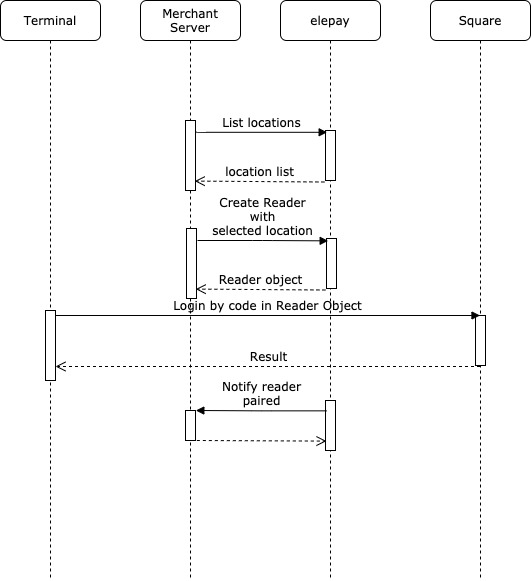
支払いの流れのイメージ
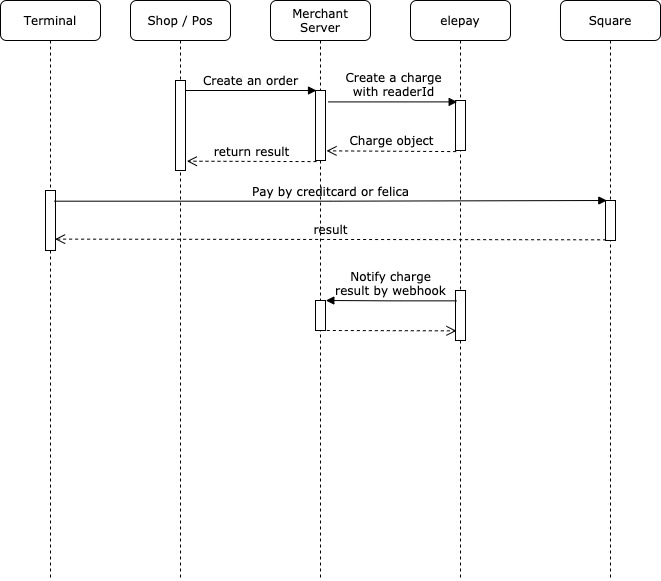
支払い処理
1. 支払いリクエスト
サーバー側の処理が elepay の Charge 機能を呼び出し、支払いをリクエストします。
📘 主なリクエスト項目説明
resource:
readerを設定してください。(次のバージョンでterminalに変更する予定です)paymentMethod: 決済方法
extra: readerId は必須項目です。
2. お客様の決済処理
クレジットカード、デビットカード、電子マネーなどの決済処理を行ます。
3. Charge オブジェクトのステータスをチェックして、支払い結果を表示
下記の二つ方法で、決済結果を確認することができます。
1. Webhook イベントの受信 支払いの成功・失敗にかかわらず、elepay は Webhook に設定された URL に対応するイベント通知を送信します。
2. 支払いステータスの取得 Charge オブジェクトの取得APIを利用してステータスの確認ができます。 支払いが成功するかタイムアウトになるまで継続的に呼び出す必要があります(推奨タイムアウト時間は60秒、呼び出し頻度は10秒1回です)。
管理画面での確認
管理画面の「支払い管理 / 支払い一覧 」にて支払いレコードを確認することができます。 返金については*返金処理*をご覧ください。
最終更新日